Guide
Farm to Table Shelf Crates and Ingredient Storage Guide
How to fix "Storage is full" errors, locked slots, and reserved slots in Farm to Table shelf crates.
Larger shelves and staff storage rules
Staff first look for available storage labeled for the product they carry. When suitable labeled space is unavailable, they try unlabeled storage. A shelf can accept part of a delivery even when it cannot fit the whole load.
Keep labeled space for staple ingredients and unlabeled room for overflow. If staff stop with products in hand, check capacity, reservations and access on both routes.
| Shelf | Capacity | Unlock level | Price |
|---|---|---|---|
| Large Shelf | 72 items: 12 crates × 6 items | 15 | 2,000 |
| High-Capacity Shelf | 192 items: 8 crates × 24 items | 25 | 6,000 |
Quick answer
If a shelf crate looks empty but refuses product, do not assume the whole storage system is broken. In the Early Access patches, the real problem can be a locked slot, a reserved slot, a staff interaction state, or a crate being used in a way the staff should ignore.
Update 1.0.92 specifically fixed cases where shelf crates showed the wrong warning when products were placed into locked or reserved slots. It also fixed an empty-looking crate saying "Storage is full" when the real issue was a reserved slot state.
"Storage is full" -- what it actually means
The message can be misleading. When a shelf crate says "Storage is full," the crate is not always physically packed with visible products.
Patch 1.0.92 fixed a case where an empty-looking crate could display that warning because the available space was reserved for staff restocking. The space was blocked by state, not by something obvious on screen.
- Locked slots reject incoming products and count as unavailable space until you unlock them.
- Reserved slots can be held by staff during a restock action; wait for the action to finish before forcing a manual deposit.
- A labeled crate can reject a different ingredient type even when the visual layout looks like it has room.
- If the message repeats every service cycle, add another crate for that ingredient category instead of moving the whole kitchen.
What the local footage confirms
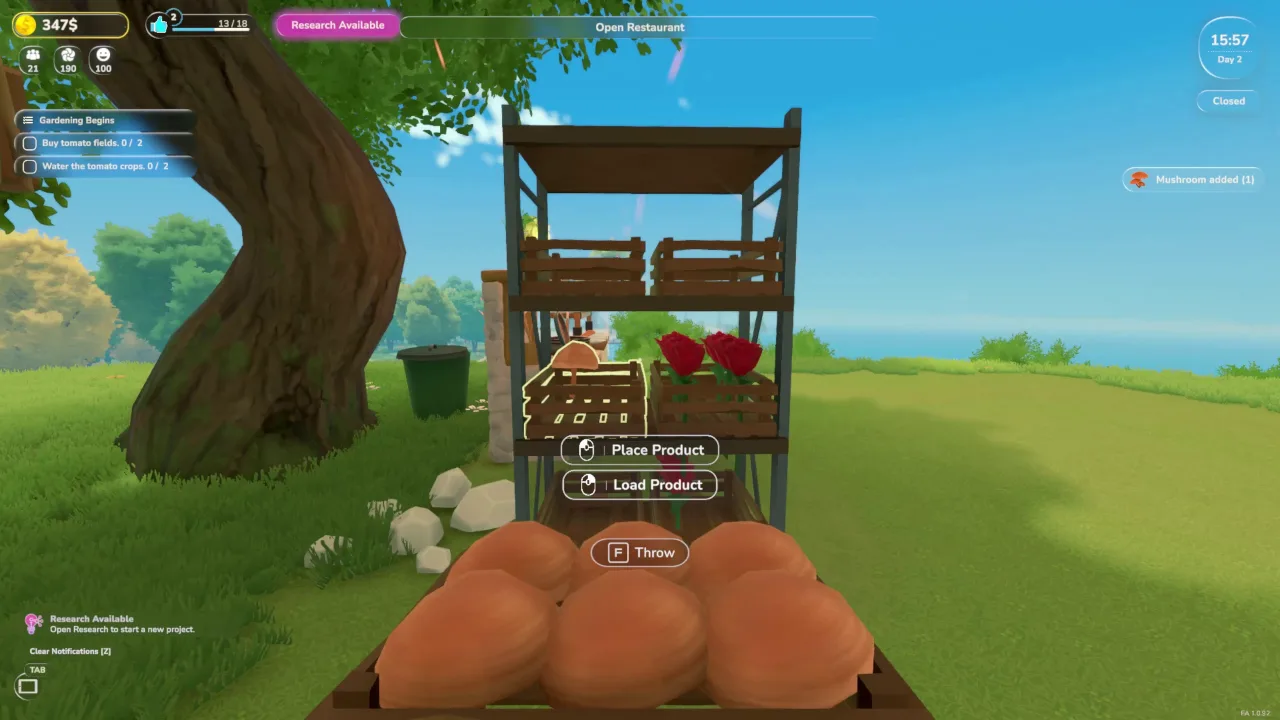
- Product shelves can hold ingredient crates and show interaction prompts such as placing or loading product.
- Crates can be carried by hand, so shelf placement affects how much walking happens during service.
- The later cooking footage shows ingredients, the stove, and the serving counter all working as one short production loop.
Why shelf crates block you
Storage has more states than "empty" and "full." A shelf can have open visual space while a specific slot is locked, reserved, or waiting for a staff action to finish. That is why the same shelf can feel fine in one service cycle and confusing in the next.
The safest early habit is to treat every shelf as part of the production route. It needs to be reachable, readable, and organized enough that both you and staff can understand what belongs there.
- Locked slots can reject products even when the crate looks like it still has room.
- Reserved slots can make an empty-looking shelf behave like it is unavailable.
- Decoration crates can confuse the layout if they sit where staff expect a working shelf crate.
- A blocked staff interaction can leave a slot reserved until the game releases it or the layout is corrected.
Storage setup that avoids the problem
- Put the first shelf close enough to the pot and serving counter that one short trip can restock the cooking loop.
- Keep one shelf section for quest ingredients such as tomatoes instead of mixing every crop into one hard-to-read pile.
- Leave at least one obvious buffer slot before opening the restaurant, especially if staff will restock during service.
- Do not place decorative shelf crates in the same path where staff are expected to move working products.
- Leave walking space between shelf, stove, counter, and tables so you can react to orders without getting stuck.
- Before opening the restaurant, check that the ingredient needed by the active menu item is already reachable.
- When a shelf shows "Storage is full" and you are certain it is not full, check locked slots before moving furniture.
- Do not manually drop products into a shelf during active service if a staff member is already walking toward it; the slot may be mid-reservation.
Use labels and wait reasons
Update 1.0.51 added a label system for shelf slots so staff can sort products more efficiently. The same update added wait reason indicators for staff when they cannot perform a task.
That means the best debugging habit is not randomly moving every shelf. First check the staff wait reason, then check whether the shelf label matches the product they are trying to move.
- Label staple ingredient shelves so vegetables, quest items, and cooked output do not fight for the same slots.
- When a staff member stops, read the wait reason before assuming the staff role is bugged.
- If a shelf looks empty but refuses product, check labels, locked slots, reserved slots, and staff access.
What this guide does not cover yet
- Capacities of other crate and shelf types beyond the two September 30 additions.
- Whether cooking stations can use nearby shelf stock directly or require the player to hold ingredients.
- Which staff roles can pull from reserved shelf slots in the current build.
- Which shelf placement saves the most time during a two-table or three-table service route.
Source notes
- Evidence: local gameplay recording FarmToTable 2026-05-28 23-59-50.mp4.
- Patch context: official Steam news for Update 1.0.51 added shelf-slot labels and staff wait reasons.
- Patch context: official Steam news for Update 1.0.92 fixed misleading shelf crate warnings around locked and reserved slots.
- Official Major Update #1, released September 30, 2026 at 09:43 PDT: https://steamcommunity.com/games/3582250/announcements/detail/679637128142913620
- The new shelf capacities below come from the announcement. Other crate limits and station-pull behavior are not established by these notes.