Guide
Farm to Table Restaurant Orders Explained
How to read the order bar, serve dishes, avoid missing ingredients, and understand the first restaurant service cycle.
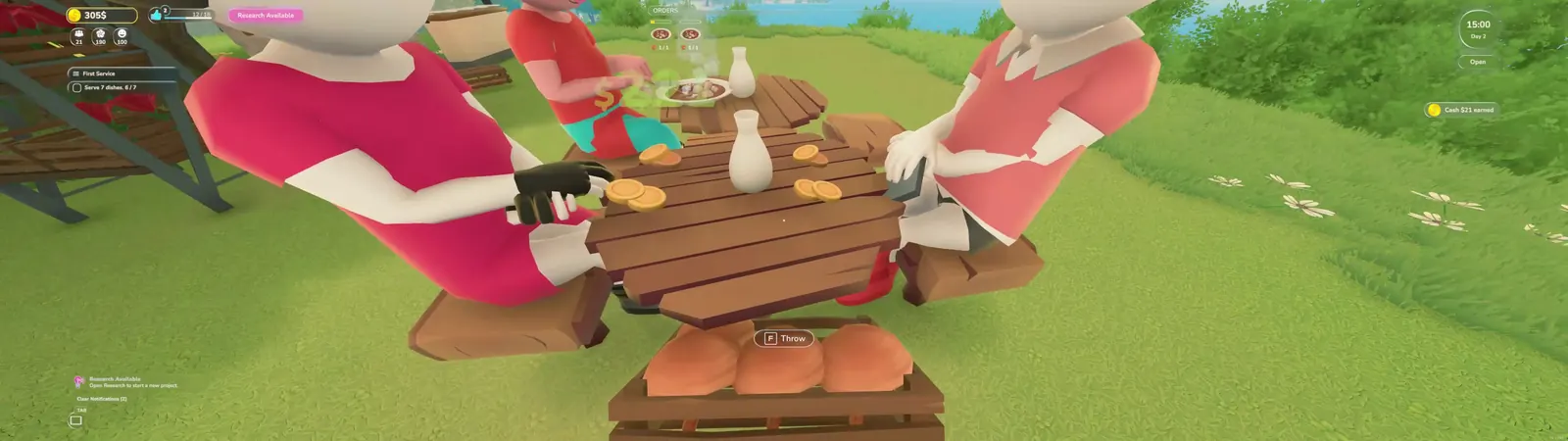
Service UI and controls updated from official Major Update #1 on September 30, 2026. The gameplay image remains May 23, 2026 evidence.
Read the updated order bar and Management screen
- Choose Small, Medium or Large HUD size. Orders that do not fit the bar are counted as +N; Large HUD shows up to five order cards at once.
- Use Needs Attention to find missing ingredients, waiting orders, table cleanliness and unhappy departures. Departure reasons include missing ingredients, service timeout, an empty menu or being sent away.
- Actual cleanliness and customer satisfaction with cleanliness are separate Management values. A clean-room percentage and a guest satisfaction score describe different things.
- Serve food with left-click by default. Talking to staff or NPCs and greeting customers uses E; change it through the Additional Interaction binding.
- After researching Waiter Payment Collection, enable it in the staff screen if wanted. Food service and cleaning stay ahead of payment collection.
How orders appear
- Active orders appear near the top of the screen with dish icons and ingredient progress.
- The first service objective can ask you to serve a set number of dishes.
- Cash notifications appear after successful service, making this a useful page for money-route testing.
Service checklist
- Before opening, confirm every seat is connected to a table.
- Keep cooked dishes and ingredient crates close to the customer area.
- Watch for warnings about missing menu ingredients before starting a long service period.
- Use the end-of-day screen to record restaurant sales, market sales, overseas order sales, and star rating.
What to turn into database data
- Dish name, required ingredients, order icon, sale value, and whether customers accept it on Day 1 or Day 2.
- Common warnings such as missing ingredients or unconnected seats.
- Day-end totals that can support future money-making guide comparisons.
Source notes
- Evidence: local gameplay recordings from May 23, 2026.
- Official Major Update #1, released September 30, 2026 at 09:43 PDT: https://steamcommunity.com/games/3582250/announcements/detail/679637128142913620
- Order values and customer behavior should be retested as Early Access balance changes.